
Return to the Home Page

Extract Nodal Load

A tool that collects the reaction forces of an ANSYS APDL analysis into Excel.
It reads the PRRSOL text listings, takes the TOTAL VALUES row or every node row and splits glued APDL numbers.
Each file becomes its own Excel sheet with a formatted table, ready for the anchor and support load checks.

Download

Calculation Steps

01

See Details

Read
(APDL Text Files)

Reads several APDL result files (.txt, .out, .lis) at once and tries five text encodings until one works.

02
See Details

Total Values
(Last VALUE Row)

Takes the last TOTAL VALUES block of each file and writes FX, FY, FZ, MX, MY and MZ in one row.

03

See Details

Node Results
(All Values)

Keeps every line that starts with a node number followed by six results and adds the TOTAL row last.

04
See Details

Excel Output
(One Sheet per File)

Writes each file to its own sheet with a blue header, a filter, the scientific number format and frozen panes.

How to Use it?

01

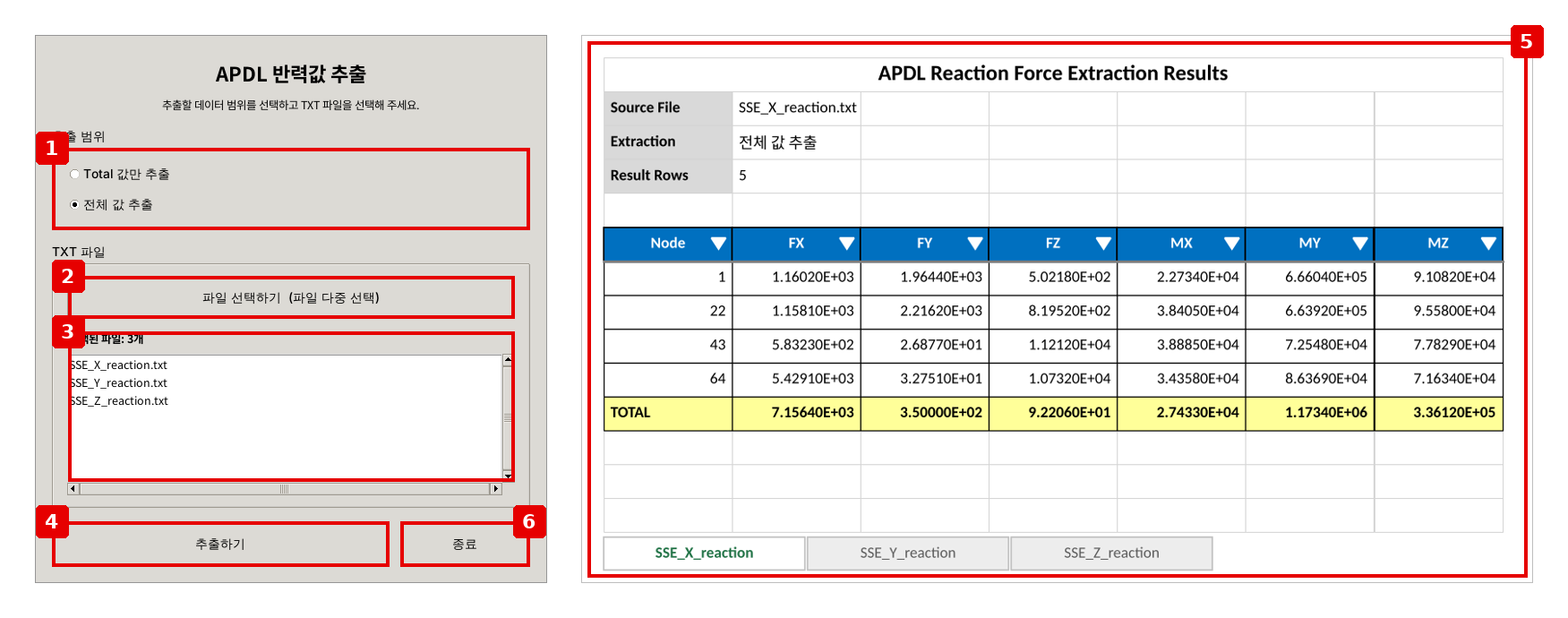
Choose the extraction range: Total only for the TOTAL VALUES row, or All values for every node row plus the total.

02

Press Select Files and pick one or more APDL reaction listings (*.txt, *.out, *.lis) printed with PRRSOL.

03

Check the file names and the file count in the list. Selecting again replaces the list.

04

Press Extract. The files are read and parsed, and Microsoft Excel opens with a new workbook.

05

Each file gets its own sheet named after the file, with the source, extraction mode, row count and result table. Failed files are listed in an error sheet.

06

Press Close to end the program.