
Return to the Home Page

Modal to Word

A tool that turns the ANSYS modal participation factor output into a Word table.
It reads the X, Y and Z blocks, finds the governing mode of each direction and keeps the modes you choose.
The table opens in Word with merged headers, borders and bold governing values, ready for the report.

Download

Calculation Steps

01

See Details

Parse
(X, Y, Z Blocks)

Reads the participation factor text pasted from Solution Information and keeps only the X, Y and Z direction blocks.

02

See Details

Target
(Governing Mode)

Finds the mode with the largest ratio in each direction and shows its effective mass in bold.

03
See Details

Modes
(Rows to Show)

Keeps mode 1, the governing modes and the last mode, adds the 6th, 10th or all modes, and marks each gap with a vertical ellipsis row.

04
See Details

Word Table
(5 or 8 Columns)

Builds the table with python-docx in a temporary file and opens it in Word, ready to copy into the report.

How to Use it?

01

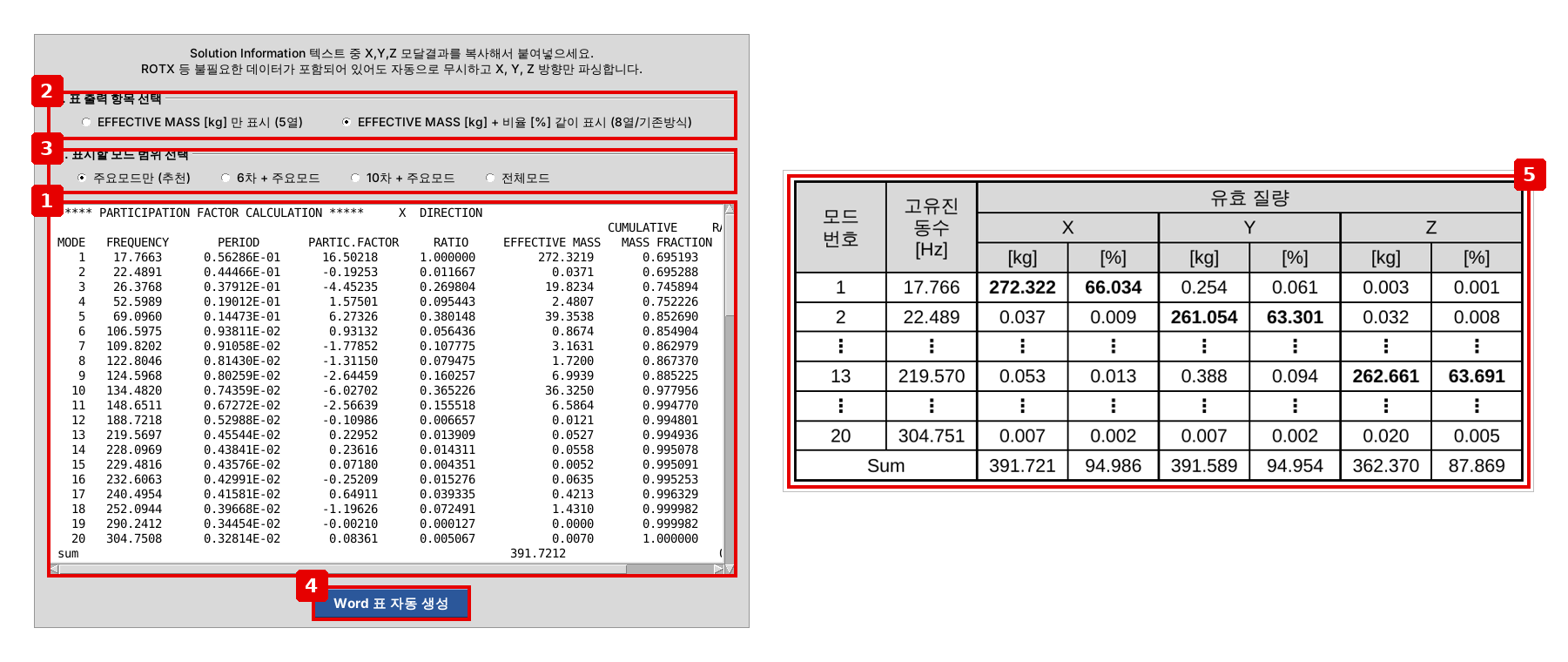
Copy the PARTICIPATION FACTOR CALCULATION part of the modal Solution Information in ANSYS and paste it into the text box. ROTX blocks are ignored.

02

Choose the table columns: effective mass [kg] only (5 columns), or [kg] with the ratio [%] (8 columns).

03

Choose the mode range: main modes only, 6th + main, 10th + main or all modes.

04

Press Create Word Table (Word 표 자동 생성). The X, Y and Z blocks are parsed and the governing modes are found.

05

Word opens with the finished table: merged header, sum row and the governing mode of each direction in bold.

06

Copy the table into the seismic qualification report. If no X, Y or Z block is found, a message box shows the error.